In today’s competitive e-commerce market, simply having an online store is not enough. Customers need to discover your products at the right time and in the right place. This is where Shopping Ads can become an important part of your digital marketing strategy.
Shopping Ads allow online stores to showcase their products directly to potential customers who are searching for products online. Instead of displaying only text, these advertisements can show product images, names, prices, store information, and other product details.
For example, imagine a customer searches for “men’s running shoes” on Google. Instead of seeing only traditional text advertisements, the customer may see several product listings with images, prices, and store names. This allows the customer to compare products before clicking.
This combination of visual presentation and purchase intent makes Shopping Ads particularly useful for e-commerce businesses.
What Are Shopping Ads?
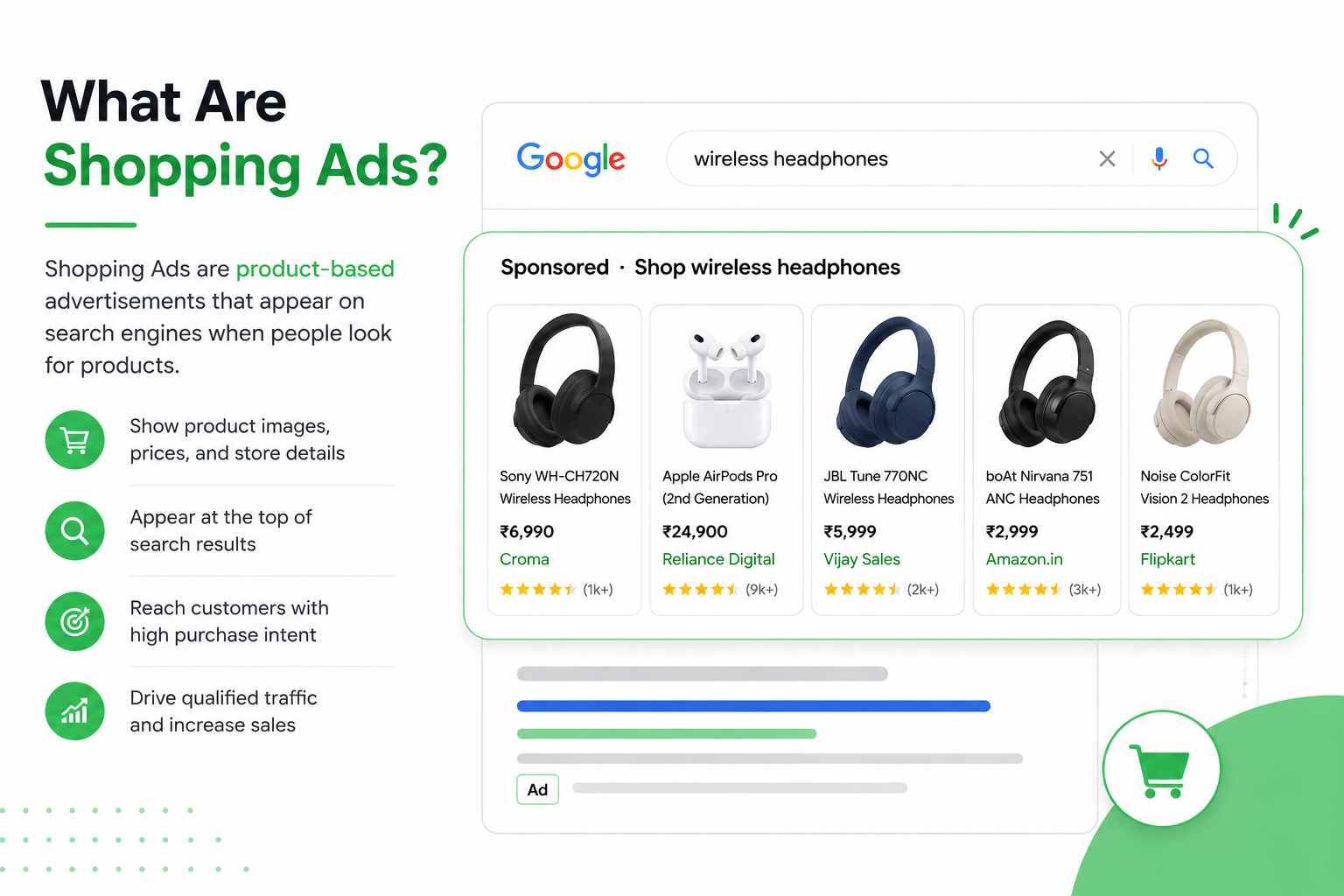
Shopping Ads are online advertisements designed specifically to promote products. They are commonly used by e-commerce businesses to display products to people who are searching for something they want to buy.
A typical Shopping Ad can include:
- Product image
- Product title
- Product price
- Brand
- Store name
- Product availability
- Promotional information
- Ratings or reviews, where eligible
Unlike traditional search advertisements, Shopping Ads focus heavily on the product itself.
The customer can often understand what the product looks like and how much it costs before visiting the website.
How Do Shopping Ads Work?
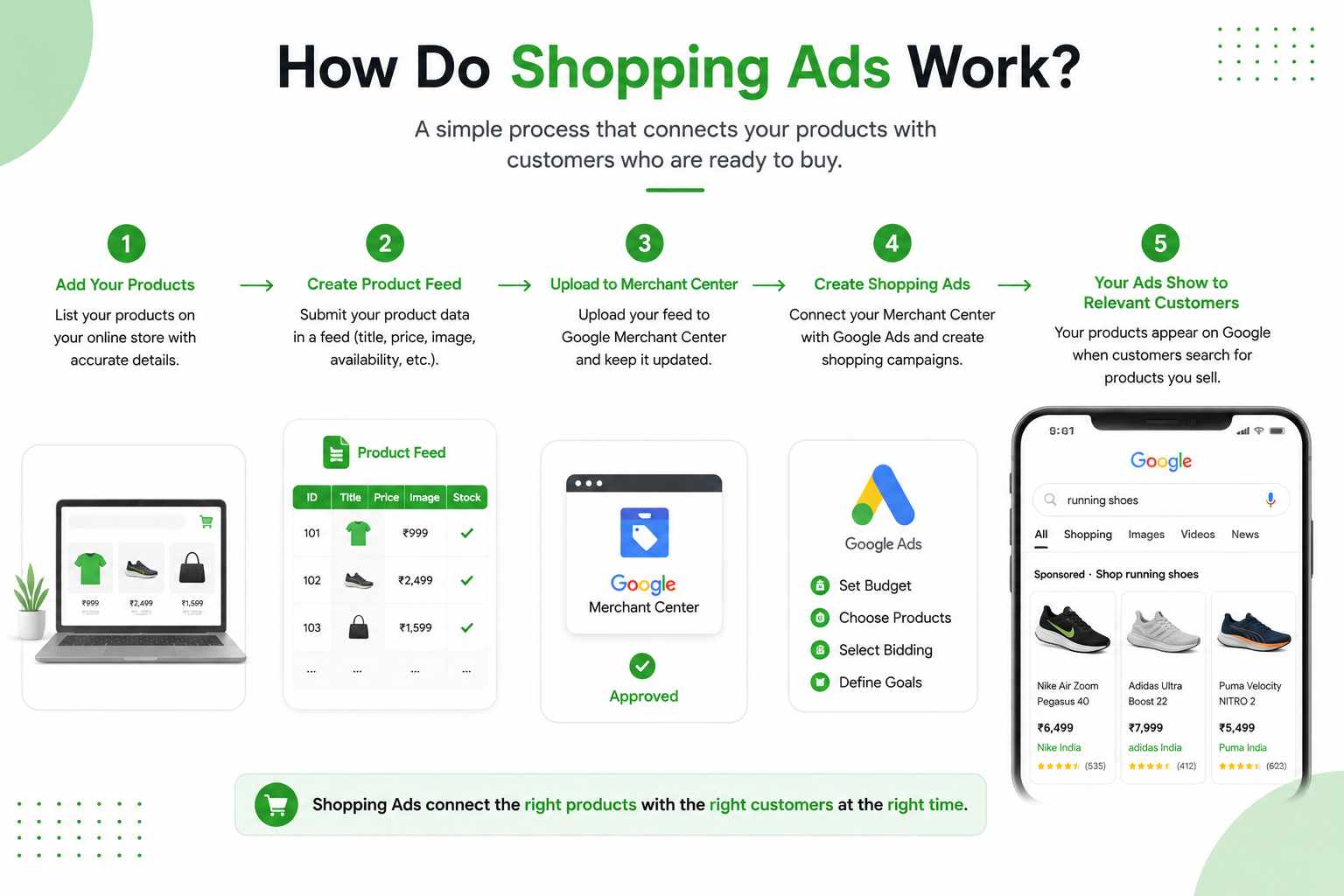
To understand Shopping Ads, it is important to understand the relationship between your online store, product data, product feed, Merchant Center, and Google Ads.
The process generally works like this:
Step 1: Add Your Products
First, your products need to be available on your e-commerce website.
Each product should have accurate information such as its:
- Name
- Description
- Price
- Image
- Brand
- Availability
- Category
- Product identifier
Step 2: Create a Product Feed
A product feed contains information about the products you want to advertise.
Think of a product feed as a digital catalog of your online store.
For example:
Product | Price | Category | Availability |
Men’s Running Shoes | ₹2,999 | Footwear | In Stock |
Women’s Sneakers | ₹2,499 | Footwear | In Stock |
Sports Backpack | ₹1,299 | Bags | In Stock |
The advertising system uses this information to understand what you sell.
Step 3: Connect Your Product Data
Your product information is submitted through Google Merchant Center and connected with your advertising campaigns.
Merchant Center acts as an important place for managing the product information that can be used across Google’s shopping experiences.
Step 4: Create Your Advertising Campaign
After your product information is available, you can create an appropriate Shopping campaign in Google Ads.
You can then set factors such as:
- Advertising budget
- Campaign goals
- Products
- Target locations
- Bidding strategy
- Conversion goals
Step 5: Your Products Can Appear to Relevant Customers
When someone searches for a product related to what you sell, the advertising system determines which products may be eligible to appear.
The system considers factors such as the product information, relevance, bid, campaign settings, and other signals.
Why Are Shopping Ads Important for E-commerce?
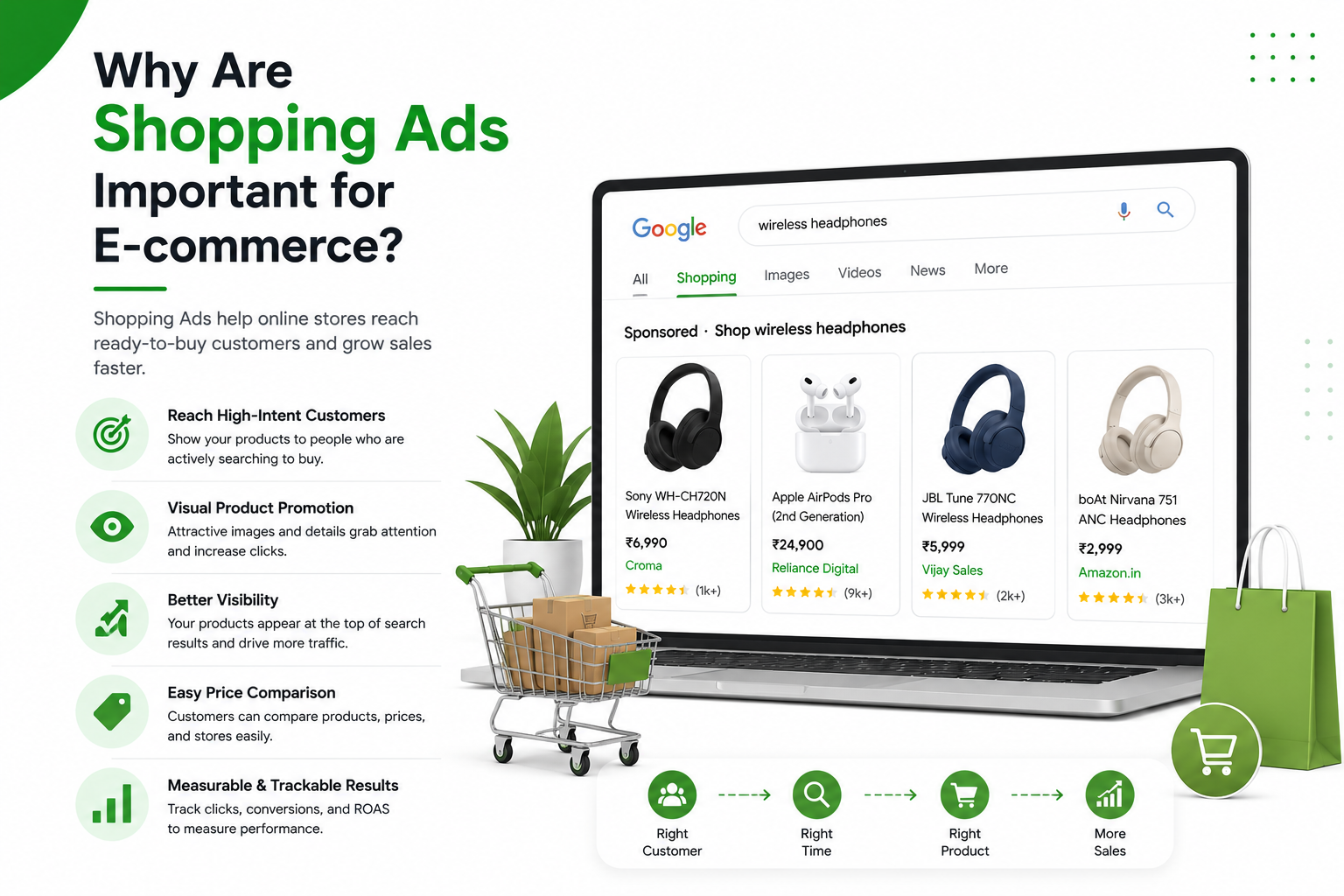
Shopping Ads can be especially useful because they connect product discovery with purchase intent.
Someone searching for “buy black sneakers online” is likely to have a stronger commercial intent than someone simply browsing social media.
Here are some major benefits.
1. Reach Customers With Purchase Intent
Shopping Ads can help businesses reach people who are actively searching for products.
This makes them valuable for businesses that want to generate product sales rather than simply increase brand awareness.
2. Show Products Visually
A picture can communicate a product much faster than a paragraph of text.
Customers can see the product before clicking, which helps them decide whether it is relevant to them.
3. Display Important Product Information
Customers can often see information such as the product name and price directly in the advertisement.
This creates greater transparency and can help users decide which products they want to explore.
4. Increase Product Visibility
A well-optimized Shopping campaign can put your products in front of potential customers who may not have discovered your store organically.
5. Track Campaign Performance
Digital advertising provides measurable data.
Businesses can monitor metrics such as:
- Impressions
- Clicks
- Click-through rate (CTR)
- Cost per click (CPC)
- Conversions
- Conversion value
- Cost per conversion
- Return on ad spend (ROAS)
This data helps marketers understand what is working and where improvements are needed.
Types of Shopping Campaigns
Shopping advertising has evolved beyond traditional product listings. Depending on your goals and account setup, you may encounter different campaign approaches.
Standard Shopping Campaigns
Standard Shopping campaigns allow advertisers to promote products using product information from their Merchant Center feed.
Advertisers can organize products and manage campaign settings based on their business goals.
Performance Max Campaigns
Performance Max campaigns can use product information along with Google’s automated systems to advertise across multiple Google properties.
For e-commerce businesses, this can provide opportunities to reach customers beyond traditional Shopping placements.
The campaign can use signals from your products, creative assets, audience information, and conversion goals to help optimize delivery.
What Is a Product Feed?
A product feed is one of the most important parts of Shopping Ads.
It is essentially a structured collection of information about your products.
A good product feed should contain accurate and complete information.
Important attributes can include:
- Product ID
- Title
- Description
- Link
- Image link
- Price
- Availability
- Brand
- GTIN, where applicable
- Product category
- Condition
The better your product information, the easier it can be for the advertising platform to understand your products.
How to Optimize Product Titles
Your product title is extremely important because it tells the advertising system and customers what your product is.
Avoid overly short or vague titles.
Weak Product Title:
“Shoes”
This title provides very little information.
Better Product Title:
“Men’s Running Shoes Black Lightweight Sports Shoes”
This provides more useful product information.
However, avoid unnecessarily stuffing keywords into product titles. Your titles should remain natural, accurate, and useful for customers.
Product Image Optimization
Images are one of the most important elements of Shopping Ads.
A poor-quality image can reduce the attractiveness of your product even if the product itself is excellent.
For better product images:
- Use high-resolution images.
- Show the actual product clearly.
- Avoid distracting backgrounds where inappropriate.
- Use accurate product photography.
- Follow the platform’s image requirements.
- Keep the product visually consistent with your website.
For example, if you sell watches, customers should be able to clearly see the watch design, strap, dial, and important details.
Landing Page Optimization
Getting a customer to click your Shopping Ad is only the first step.
The next step is converting that visitor into a customer.
Your product landing page should:
- Load quickly.
- Work well on mobile devices.
- Match the product shown in the advertisement.
- Display the correct price.
- Provide clear product information.
- Include high-quality images.
- Make the purchase process simple.
- Provide clear shipping and return information.
If your Shopping Ad promotes a black Nike shoe but the customer lands on a page showing multiple unrelated products, the customer may leave.
A strong connection between the ad and landing page creates a better user experience.
Shopping Ads and Keywords
Traditional Search Ads often rely heavily on keywords selected by advertisers.
Shopping Ads work differently because product information from your feed helps determine when your products may be shown.
This makes product data optimization extremely important.
Relevant information in your product title, description, category, and other attributes helps the system understand what you are selling.
For example, if you sell:
“Women’s Waterproof Hiking Boots – Brown“
Your product information provides signals about:
- Gender
- Product type
- Feature
- Use case
- Color
This can help your product become eligible for relevant shopping searches.
Shopping Ads vs Search Ads
Although both are used through Google Ads, Shopping Ads and Search Ads have different formats.
Shopping Ads
Shopping Ads can show:
- Product image
- Product title
- Price
- Store information
- Product-related details
Search Ads
Search Ads generally use:
- Headlines
- Descriptions
- URLs
- Ad assets
For e-commerce businesses, using both formats can create a broader advertising strategy.
Shopping Ads vs Social Media Ads
Shopping Ads and social media advertising can serve different purposes.
Shopping Ads are particularly useful for reaching people who are actively searching for products.
Social media ads can be useful for discovering and influencing potential customers based on interests, behaviors, demographics, and other targeting signals.
For example:
A customer searching for “buy men’s running shoes” may have strong purchase intent.
A person watching a fitness video on Instagram may not be actively shopping but could still become interested in running shoes after seeing an attractive advertisement.
Using both channels can help businesses reach customers at different stages of the buying journey.
How Much Do Shopping Ads Cost?
The cost of Shopping Ads depends on several factors.
These can include:
- Product category
- Competition
- Location
- Campaign strategy
- Bid strategy
- Customer demand
- Product price
- Advertising budget
- Campaign performance
There is no single fixed price for Shopping Ads.
Instead, businesses usually set a budget and monitor how efficiently that budget generates valuable actions such as sales.
One important metric is ROAS (Return on Ad Spend).
For example, if a business spends ₹10,000 on advertising and generates ₹40,000 in tracked revenue from those ads, the ROAS is:
₹40,000 ÷ ₹10,000 = 4
That means ₹4 in tracked revenue was generated for every ₹1 spent on advertising.
Remember that ROAS is not the same as profit because product costs, shipping, salaries, taxes, and other expenses also need to be considered.
Strategies to Improve Shopping Ads Performance
Once your campaign is running, optimization becomes important.
1. Improve Product Titles
Make your product titles descriptive, accurate, and relevant.
2. Improve Product Images
Test better-quality product photography and make sure the product is clearly visible.
3. Analyze Your Best-Selling Products
Identify which products generate the most valuable results and allocate your advertising resources accordingly.
4. Monitor Search Performance
Look at the types of searches and customer behavior associated with your products.
5. Improve Your Website
A good advertisement cannot compensate for a poor website experience.
Improve:
- Website speed
- Mobile usability
- Product pages
- Checkout process
- Navigation
- Trust signals
6. Track Conversions
Make sure your conversion tracking is correctly configured so you can understand which campaigns and products are generating results.
7. Test and Optimize
Digital advertising should not be treated as a one-time activity.
Regularly review your:
- Budget
- Product performance
- Conversion data
- ROAS
- Landing pages
- Product feed
- Campaign settings
Common Shopping Ads Mistakes
Many e-commerce businesses make avoidable mistakes when setting up Shopping Ads.
Poor Product Information
Incomplete or inaccurate product information can make it harder for advertising platforms to understand your products.
Low-Quality Images
Customers may ignore products that do not look professional or trustworthy.
Incorrect Prices
The price displayed in your advertisement should match the price on your website.
Slow Website
If your website takes too long to load, potential customers may leave before purchasing.
No Conversion Tracking
Without accurate tracking, it becomes difficult to understand whether your advertising investment is generating sales.
Ignoring Mobile Users
A large portion of online shopping happens on mobile devices, so your website should provide a smooth mobile experience.
Example of a Shopping Ads Strategy
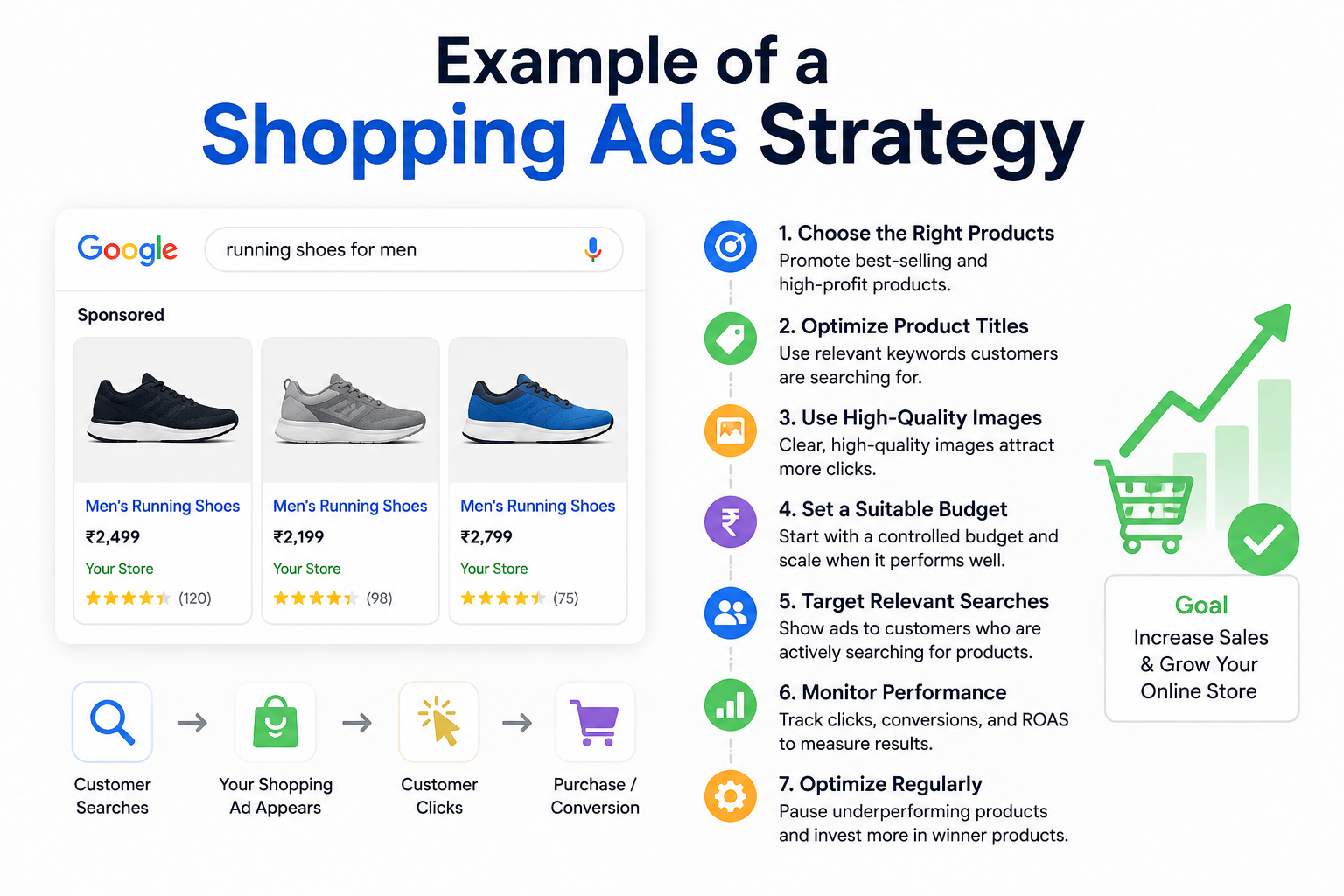
Imagine you own an online clothing store called Urban Style.
You sell:
- T-shirts
- Jeans
- Sneakers
- Jackets
Instead of advertising every product equally, you could analyze your sales and identify your strongest products.
Suppose your black sneakers generate the highest profit.
You could:
- Improve the product title.
- Add high-quality images.
- Make sure the product feed is accurate.
- Check the product landing page.
- Create an appropriate campaign.
- Set a suitable budget.
- Track conversions.
- Monitor ROAS.
- Optimize based on performance.
This creates a data-driven approach rather than simply spending money on advertisements without measuring the results.
How Shopping Ads Help the Customer Journey
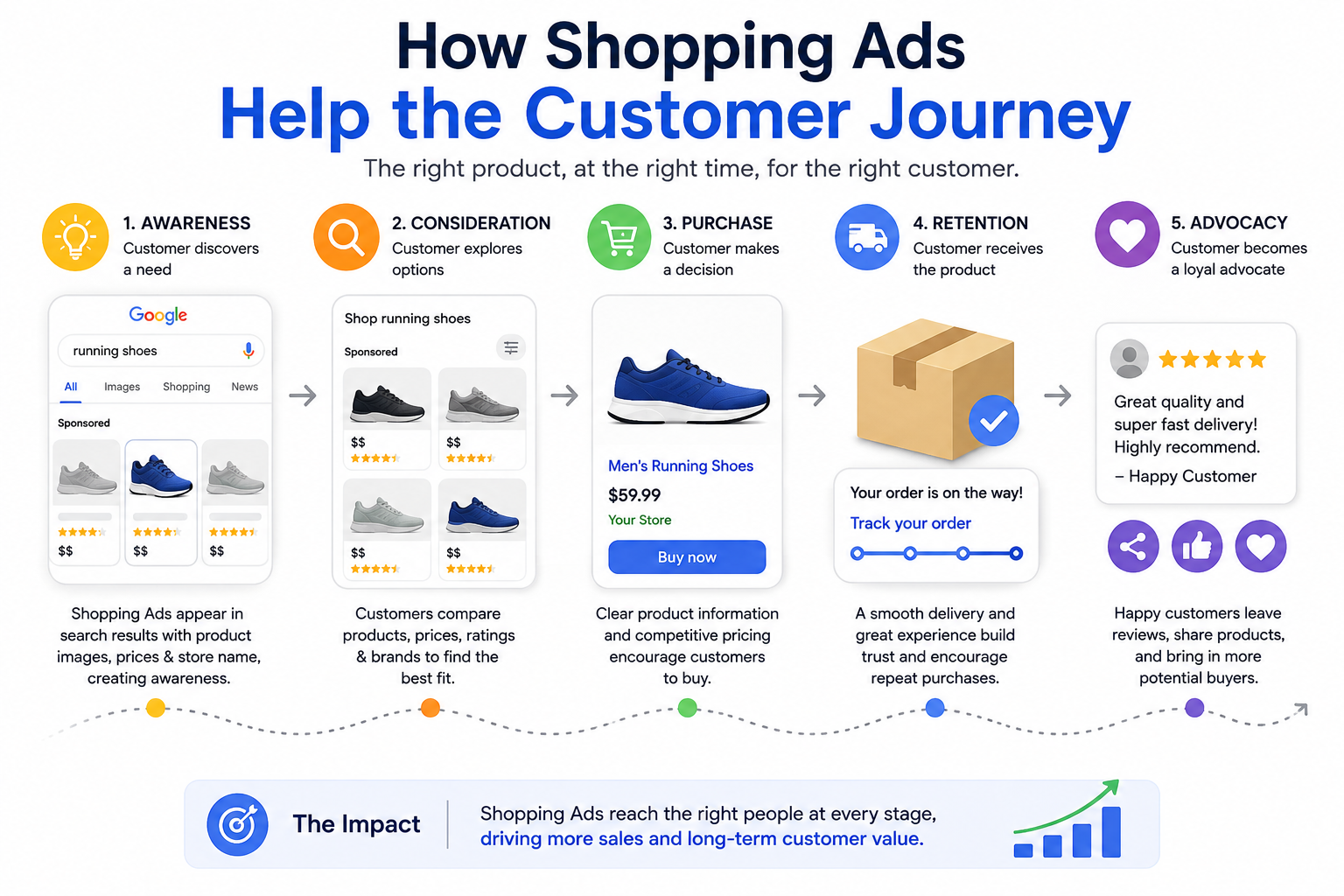
Shopping Ads can play an important role throughout the buying journey.
Awareness
A customer discovers your product while searching for something relevant.
Consideration
The customer compares your product with competing products.
Purchase
The customer clicks through to your website and completes the purchase.
Retention
After purchasing, you can use other digital marketing strategies such as email marketing, remarketing, and loyalty campaigns to encourage future purchases.
This shows that Shopping Ads are not isolated from your overall marketing strategy. They can work alongside SEO, social media marketing, content marketing, email marketing, and conversion rate optimization.
Final Thoughts
Shopping Ads can be a powerful advertising channel for e-commerce businesses because they connect products with customers who are actively looking for things to buy.
However, successful Shopping Ads are not simply about increasing the advertising budget. Strong performance depends on several factors, including product feed quality, product titles, images, pricing, landing pages, campaign structure, conversion tracking, and continuous optimization.
For an online store, the goal should not simply be to get more clicks. The real goal is to attract relevant customers and generate profitable sales.
By combining well-optimized product information with a strong website and data-driven campaign management, businesses can use Shopping Ads as an important part of their e-commerce growth strategy.